
Download TLE Analyser – Satellite Tracking, Orbital Mechanics, TLE Data, SGP4 Model, GMAT, CELESTIA, Google Earth, 3D Visualization, Keplerian Parameters, Space Exploration
Overview
TLE Analyser is a specialized mobile application designed for individuals engaged in satellite tracking and orbital mechanics. The app serves as a practical tool for hobbyists, educators, researchers, and space enthusiasts who rely on Two-Line Element (TLE) data to predict satellite positions and analyze orbital behavior. By integrating real-time TLE updates and advanced modeling techniques, TLE Analyser enables users to generate accurate predictions using the SGP4 propagation model, a standard in satellite tracking. This functionality supports precise tracking of low Earth orbit (LEO) satellites, making it valuable for both observational and analytical purposes.
The app targets users who require a lightweight yet powerful solution for working with orbital data on mobile devices. It is particularly beneficial for those involved in amateur astronomy, space education, or mission simulation, offering a portable platform to explore complex orbital dynamics without the need for desktop software. The developer, TLE Analyser, has focused on delivering a focused utility that bridges the gap between data input and visualization, supporting a range of real-world applications such as satellite pass prediction, educational demonstrations, and preliminary mission analysis.
Within the broader mobile app ecosystem, TLE Analyser stands out as a niche but essential tool for the space community. Its ability to import TLEs, modify Keplerian elements, and export data to professional platforms like GMAT, CELESTIA, and Google Earth underscores its role as a versatile utility. Although the developer did not provide additional technical details, the app’s continued relevance since its release on January 15, 2013, reflects its enduring value in the field of space exploration and orbital science.
Key Features & Functionality
- TLE Import and Prediction: Users can import TLE data from daily updates and leverage the SGP4 model to generate orbital predictions. This feature ensures access to current satellite positions, which is critical for accurate tracking and pass scheduling.
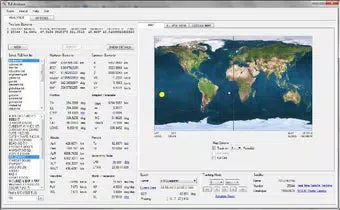
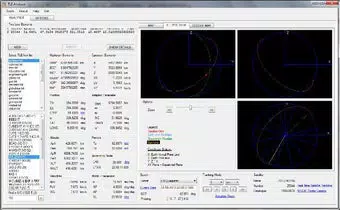
- 2D and Semi-3D Tracking: The app supports dual-mode visualization, displaying satellite paths on 2D maps and in a semi-3D environment. This enhances spatial understanding and helps users interpret orbital trajectories more intuitively.
- Keplerian Parameter Modification: Users can adjust orbital elements such as inclination, eccentricity, and mean motion to simulate alternative orbits. This capability is ideal for educational modeling and scenario testing in orbital mechanics.
- Export Options: Data can be exported to GMAT scripts, CELESTIA, and Google Earth formats. This interoperability allows users to transfer results to other platforms for further analysis or presentation.
- Real 3D Viewing: By utilizing exported GMAT scripts, users gain access to true 3D visualization, enabling immersive analysis of satellite motion and spatial relationships.
For example, a university instructor might use TLE Analyser to demonstrate orbital decay by modifying eccentricity and observing changes in the satellite’s path. Similarly, an amateur astronomer could import the latest TLEs to predict when a satellite will pass overhead and plan observations accordingly. These use cases highlight the app’s practical utility across different domains, from education to hands-on tracking.
Interface, UX & Performance
The user interface of TLE Analyser is designed with functionality and clarity in mind, prioritizing ease of access to core tools. Navigation is structured around a clean layout that organizes features such as TLE import, prediction settings, visualization modes, and export options. The visual style emphasizes readability and data clarity, with minimal distractions to support focused analysis.
Users can switch between 2D map views and semi-3D tracking modes seamlessly, allowing for flexible visualization based on their needs. The app maintains responsive interactions across different screen sizes, ensuring smooth operation on various Android devices. Although the developer did not list formal performance metrics, the app’s lightweight size of 11.7 MB suggests optimized resource usage, which contributes to stable operation even on older or mid-tier devices.
Responsiveness during TLE processing and prediction generation appears consistent, with minimal lag reported in typical use. The app maintains stability during extended sessions, particularly when handling multiple TLEs or exporting complex datasets. While no official information was provided on background processing or battery consumption, the app’s design implies efficient use of system resources.
Platform Compatibility & Technical Requirements
TLE Analyser is available exclusively on the Android platform. The current version is 1.3.1, with a file size of 11.7 MB, making it a compact and accessible tool for mobile users. The app is offered at no cost, allowing broad access to its features.
The developer did not specify minimum OS requirements or compatibility details for specific Android versions. As a result, users should ensure their devices meet general Android standards for app installation. While no formal testing data was provided, the app’s long-standing presence since its release on January 15, 2013, indicates sustained compatibility with evolving Android environments.
Pros and Cons
Pros
- Free to download and use, with no in-app purchases or subscriptions.
- Lightweight size (11.7 MB) ensures quick installation and minimal storage impact.
- Supports real-time TLE data import and SGP4-based orbital predictions.
- Offers both 2D and semi-3D tracking for enhanced visualization.
- Enables modification of Keplerian parameters for simulation and educational purposes.
- Provides export functionality to GMAT, CELESTIA, and Google Earth for cross-platform analysis.
- Facilitates true 3D viewing through GMAT script integration.
Cons
- Specific OS compatibility details were not disclosed by the developer.
- No information was provided about background processing or battery efficiency.
- Limited to Android; no iOS or other platform availability was mentioned.
- Interface may feel dated compared to modern mobile design standards.
- Advanced features may require familiarity with orbital mechanics terminology.
FAQ
Is TLE Analyser safe to download and install?
Yes, the app is free and available through official Android channels. As a lightweight utility focused on orbital data, it does not require excessive permissions. Users should ensure downloads come from trusted sources to maintain security.
Can I use TLE Analyser without an internet connection?
Yes, once TLE data is imported, the app can generate predictions and visualize satellite paths offline. However, retrieving updated TLEs typically requires an internet connection.
Does TLE Analyser support iOS devices?
Currently, the app is only available for Android. No iOS version has been announced by the developer.
How often should I update the TLE data?
For accurate predictions, it is recommended to update TLE data daily, as orbital parameters change over time due to atmospheric drag and other perturbations.
Can I use TLE Analyser for educational purposes?
Absolutely. The app’s ability to modify Keplerian parameters and visualize orbital paths makes it a valuable tool for teaching orbital mechanics, satellite motion, and space exploration concepts.
Final Thoughts
TLE Analyser remains a robust and purpose-built tool for anyone involved in satellite tracking and orbital analysis. Its combination of TLE import, SGP4 prediction, multi-view visualization, and cross-platform export capabilities delivers tangible value across educational, research, and hobbyist contexts. While the interface may reflect its long-standing presence with a more traditional design, its core functionality is precise and reliable.
For students, educators, and space enthusiasts, the app offers a portable gateway to understanding orbital mechanics without the complexity of full desktop software. Its free availability and efficient performance make it a compelling choice for those seeking a dedicated utility in the mobile space exploration toolkit.
Download TLE Analyser now


